
Owner
The whole administration area: services and prices, staff, clients, shop, reports and the website. Identity, look, legal and provider settings are read-only in the demo.
owner@salonbooking.osdot.net- Password
Larkspur-Demo-2026
Demo
A public demo runs on its own website with a fictional salon, Larkspur Salon, and its sample bookings, clients and shop. Browse it as a visitor, book as a client, or log in as the owner, the front desk or a stylist.
The demo runs the product in its public-demo mode on a separate website. The server refuses changes to the salon’s identity, its look, legal pages, integrations and payment settings. No e-mail, text message or push notification leaves the server: each one is recorded as a simulated delivery. Google sign-in is off in the demo.
This is a public demo with sample data. Demo data resets twice a day: any bookings or changes may be removed at the next reset. Do not enter real personal, payment, confidential or API information.

Sign in with one of the four demo accounts to see each role. All four use the same password.
The whole administration area: services and prices, staff, clients, shop, reports and the website. Identity, look, legal and provider settings are read-only in the demo.
owner@salonbooking.osdot.netLarkspur-Demo-2026The day’s calendar, desk and phone bookings, walk-ins, call-backs and the end of the day.
frontdesk@salonbooking.osdot.netLarkspur-Demo-2026The stylist’s own day: their appointments and their schedule.
stylist@salonbooking.osdot.netLarkspur-Demo-2026The salon’s website as a signed-in client: booking, My bookings and the shop.
client@salonbooking.osdot.netLarkspur-Demo-2026Password for all four demo accounts: Larkspur-Demo-2026. These are shared public accounts with sample data: their password, e-mail address and role cannot be changed, and every change is cleared at the next reset. Clients can also sign in with a code to their own e-mail address; in the demo the code is shown on screen instead of being sent.
Public demo app
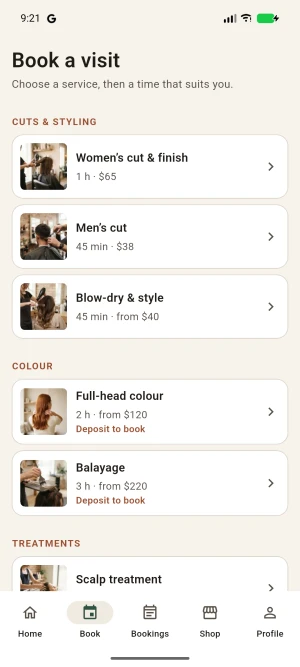
The customer app from Salon Booking OS by OsDot™, built for evaluation. It connects only to the public demo and shows Larkspur Salon’s sample data. It is not on Google Play and it is not your salon’s production app: your own app is built from the included Flutter source under your salon’s name.
Install it only from this page, and compare its SHA-256 checksum if you want to verify the download.

The salon’s website in each theme, Light and Dark — try the look switcher — with its services, team, blog and shop.
Book a service: choose a stylist and an available time, confirm with the code, then see the confirmation, the booking under My bookings and the shop.
The day’s calendar, a desk or phone booking, a walk-in, call-backs and the end of the day.
Services and prices, staff and hours, clients, shop orders, reports and the website — read-only where the demo protects its configuration.
Version 1.0.0 installs without demo data: a new installation starts empty, ready for your own salon. To see it with sample data, use the public demo or the Android demo app.
The customer app, connected to the public demo.
Step-by-step videos, from installation to the shop.
Installation, configuration and the mobile app build, in detail. Every package also ships it as offline HTML.